Myar Aranath Installation Guide
[☆ Posted: Mar. 5, 2026.]
Taken from this incredible comment by Imaginary-Mud6004 on r/Enderal. I would have struggled and possibly given up on getting this twenty-year-old Morrowind mod to run if not for their kindness. I did, however, make a few alterations, so I thought it would be worthwhile to ensure these instructions are archived, if just for my own reference, and to jot down what I did differently.
1. Install a clean copy of Morrowind. (I used the Steam version.)
2. On the SureAI page for Myar Aranath, download the Full Version. None of the patches; just the full version. (The translation patch released prior to the patches, so they apparently aren't compatible.)
3. On ModDB, download the English patch.
4. On Nexus, download Kezyma's Myar Aranath English Translation Race Fix. This will give you the intended selection of unique races during character creation instead of Elder Scrolls ones.
5. On Nexus, download this fork of Wyre Mash. This is a mod manager for Morrowind, but updated to not make you want to cry installing it if you aren't already familiar. You can possibly use other mod managers, like MO2, but I had issues getting MO2 to play nice with Myar Aranath. Additionally, I used the installer version.
6. Extract MA_Setup.zip then run the exe. It will be in German, but it's straightforward. When prompted for the location of your Morrowind folder, you will most likely have to direct it yourself...unless you're playing a hard copy or something in the 2020s. Ensure you direct it to the main Morrowind directory, not the data files folder.
7. In your Morrowind folder, find and start mae.exe. Set the Autostart(MW) to your Morrowind.exe. (Suchen will open the file explorer.)
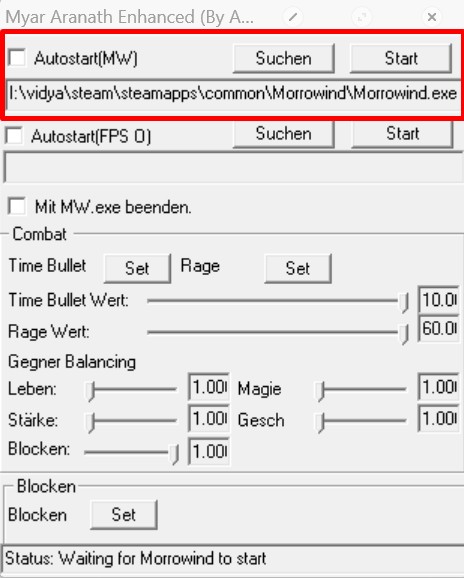
I have no idea what the other options do beyond that they relate to unique mod mechanics. I never figured them out, so I left them alone.
Close out mae.exe once you have Autostart(MW) set. Start will...uh, start the game, but it isn't going to work yet.
8. Extract MA_Translations.7z. Inside the extracted folder, additionally extra MA_RoK_Eng_v0001.7z. And then inside that extracted folder, copy both files (a Morrowind.ini and data files folder) into your main Morrowind directory.
9. Back inside the extracted MA_Translations folder, extract the other zip, MA_AdditionalTranslations.7z. Copy both files (Additional_Journal_Translations_ENG and Journal Translations) into the data files folder.
10. Extract Kezyma's Myar Aranath English Translations Race Fix-49823-0-1-1621537341.zip then copy Myar_Aranath_English_Race_Fix into the data files folder.
11. In your Morrowind directory, head into the mopy folder and use mash64 to run Wyre Mash.
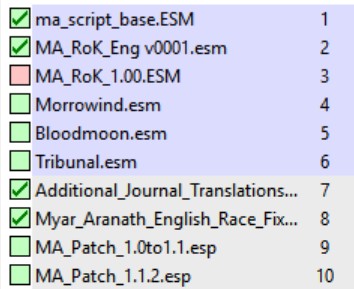
12. In Wyre Mash, all of the normal game files (Morrowind/Bloodmoon/Tribunal.esm) and mod files will be listed.
Files that should be unchecked:
- Morrowind.esm
- Bloodmoon.esm
- Tribunal.esm
- MA_RoK_1.00.esm
- MA_Patch_1.0to1.1.esp
- MA_Patch_1.1.2.esp
Files that should be checked:
- ma_script_base.esm
- MA_RoK_Eng v0001.esm
- Additional_Journal_Translations_ENG.esp
- Myar_Aranath_English_Race_Fix.esp
- ma_script_base.esm
- MA_RoK_Eng v0001.esm
- Additional_Journal_Translations_ENG.esp
- Myar_Aranath_English_Race_Fix.esp
13. With that sorted, open mae.exe back up and hit start! You should be able to play the dang thing now! You cannot start the game through Morrowind.exe.
For Steam users:
In your Morrowind folder, find mae.exe, right click and copy the path for this file. Now, in Steam, right click Morrowind and go to Properties. Where it says "Enable the Steam Overlay while in-game", disable this. Having the overlay on was giving me troubles with launching the game through mae.exe. Next, scroll all the way down on this same tab where it says LAUNCH OPTIONS and input this: "[mae.exe file path]" %command%[mae.exe file path] should be the file path you just copied, for example mine is D:\SteamLibrary\steamapps\common\Morrowind\mae.exe. Remember to include the quotations in this command. You can close properties. NOW, when you launch Morrowind through Steam, it will open mae.exe instead. This is necessary, because when trying to open morrowind.exe through mae.exe without this workaround, Steam will throw a fit that a program other than it is trying to launch IT'S morrowind.exe. With this fix, and opening mae.exe through Steam, you can proceed with Step 14. Enjoy!
While this originally worked like a charm for me, I had severe problems with even getting the game to start after a bit. Turns out OpenMW works beautifully with Myar Aranath, so I would personally recommend installing that, too.
If you don't want to use OpenMW, scroll down to the bottom for some additional advice on the game.
14. Install OpenMW. It's very straightforward and presently maintained, so you shouldn't have any trouble.
15. Navigate to your OpenMW install folder and run openmw-launcher.
16. Like with Wyre Mash, we need to check and uncheck the same files and sort them into the correct load order. Right above the list of files, there is a box you need to ensure is set to MA_RoK_Eng v0001.esm so the applicable files will populate below.
Check these files and put them in the following order:
- builtin.omscripts
- ma_script_base.esm
- Additional_Journal_Translations_ENG.esp
- Myar_Aranath_English_Race_Fix.esp
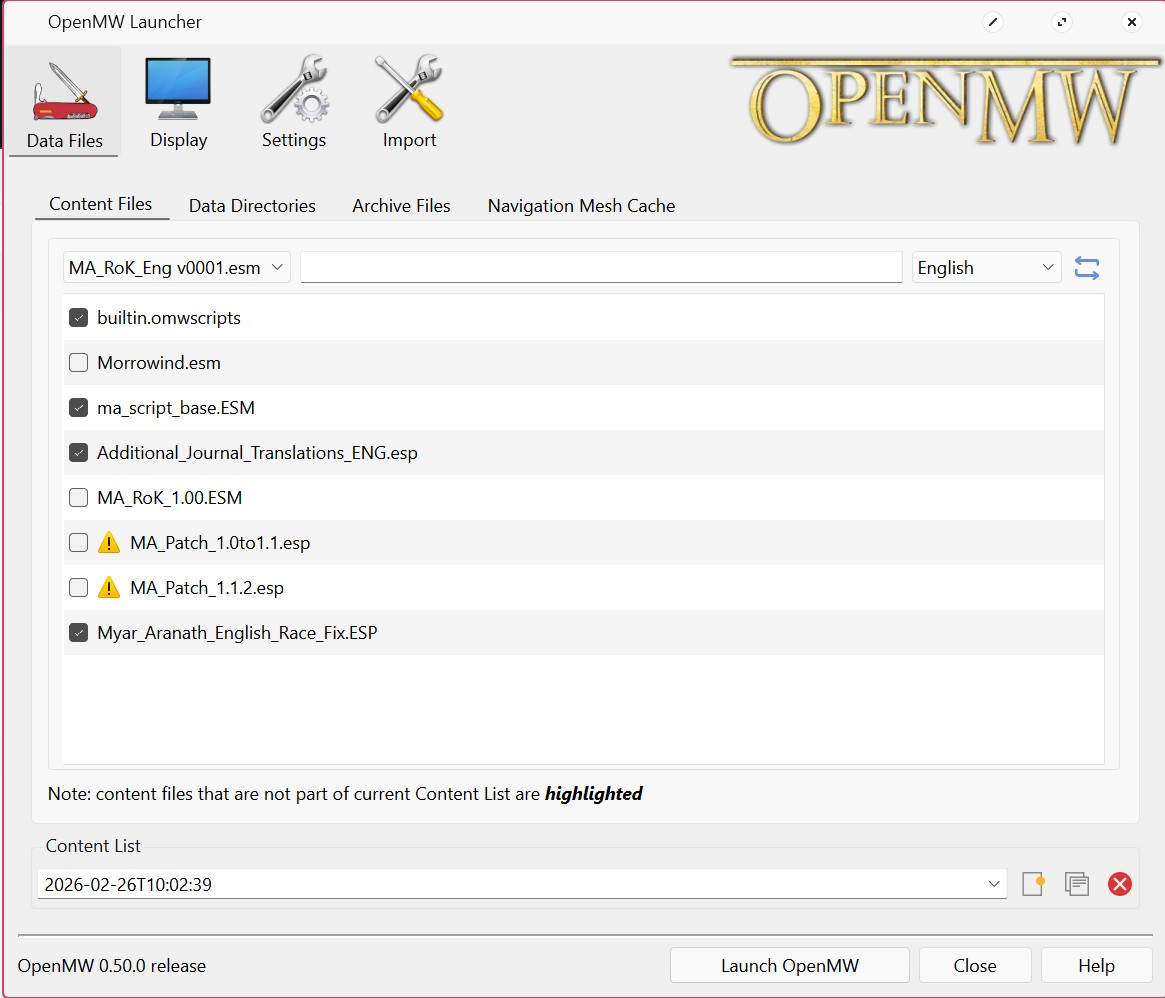
15. Hit the Launch OpenMW button at the bottom! Unlike with Wyre Mash, you will start the game through this launcher instead of through mae.exe. This could break the unique gameplay mechanics, but I have no idea. I never figured them out before the game broke and I had to switch to OpenMW to get it running again. (Heads up that I had to restart my game once I switched to OpenMW.)
Tips:
- Do not make a female character! Unfortunately, things will break due to the fact the English translation doesn't play nice with the game patches.
- The translation becomes increasingly incomprehensible as you go on. Toward the end of the main quest when you're heading to confront the villain, the queen will give you an entire rundown of the plan. I could mostly figure out what I needed to do, but once on Kallidar, one thing tripped me up: to get inside the Black Citadel, you need to go south and find a little island surrounded by lava. This is the Bautunnel. Follow that along and things become clearer again.
- Books will all still be in German. The translator just...never got to them, I guess.
- If you are able to use the new gameplay mechanics:
- SureAI's map of the game world.
- A clunky, but helpful list of the main and side quests. It won't exactly guide you, but it gives you a sense of where you are in the story. I've heard at least one of the side quests is broken apparently, but...I didn't really try to play many of them lol.
- Console commands from Morrowind will work!
Play around with the bindings for the new gameplay features! You have bullet time, this is self explanatory. Turns Morrowind into Max Payne. You have rage, which builds up overtime and buffs stats on use, though I'm not quite sure what causes it to build up. Then, you have block, which when held down, knocks all your melee skills down to 0 (so you can't abuse it) but greatly improves the chances you will block an attack by a ton. This makes the combat much more involved and fun. You will likely want to make liberal use of this, because as previously mentioned, the intro doesn't F around. In addition to these gameplay changes, you will have the 3 unique races thanks to the patch, and a bunch of graphics overhauls and NPC behaviors from the Script Extender!